
Trading is tough. Day trading is tougher.
Right. Heard that way too many times. And it so happens that I agree whole heartedly.
One of the most difficult things about Day Trading is staying in the game, following that price trend as it meanders its way across the screen, driven by the actions of millions of fellow traders and institutions, till that lovely trend changes. I have tried many different ways of staying in the game and I finally decided to bite the bullet and create an indicator that I can use - the Intraday ATR based Trailing Stop Loss Indicator.
This indicator is a part of Charanna Vyapari and available out of the box. Here I will describe what it does and how to use it. I will also share a TradingView PineScript that you can use.
What does it do?
The Intraday ATR TSL indicator uses an user configurable "Anchor Bar" as it's starting point. The anchor bar is specified as a date - time, e.g., 27-08-2025 09:45. It computes it's value and will render for the remainder of the day. The idea is to calculate a trailing stop loss, for a given trading direction - LONG or SHORT, using an Average True Range (ATR) multiple to be added or subtracted from the bar's price. The bar price to be used can be configured as any of Open, High, Low, Close, HL2, HLC3 or OHLC4. Take your pick. The value will change with the price but will not change direction like the Super Trend Indicator. Rather it will flatten out if the price starts moving in the opposite direction to the original trend, allowing us to use it as a very effective exit mechanism - an excellent Volatility based Trailing Stop Loss.
Lets look at an example.
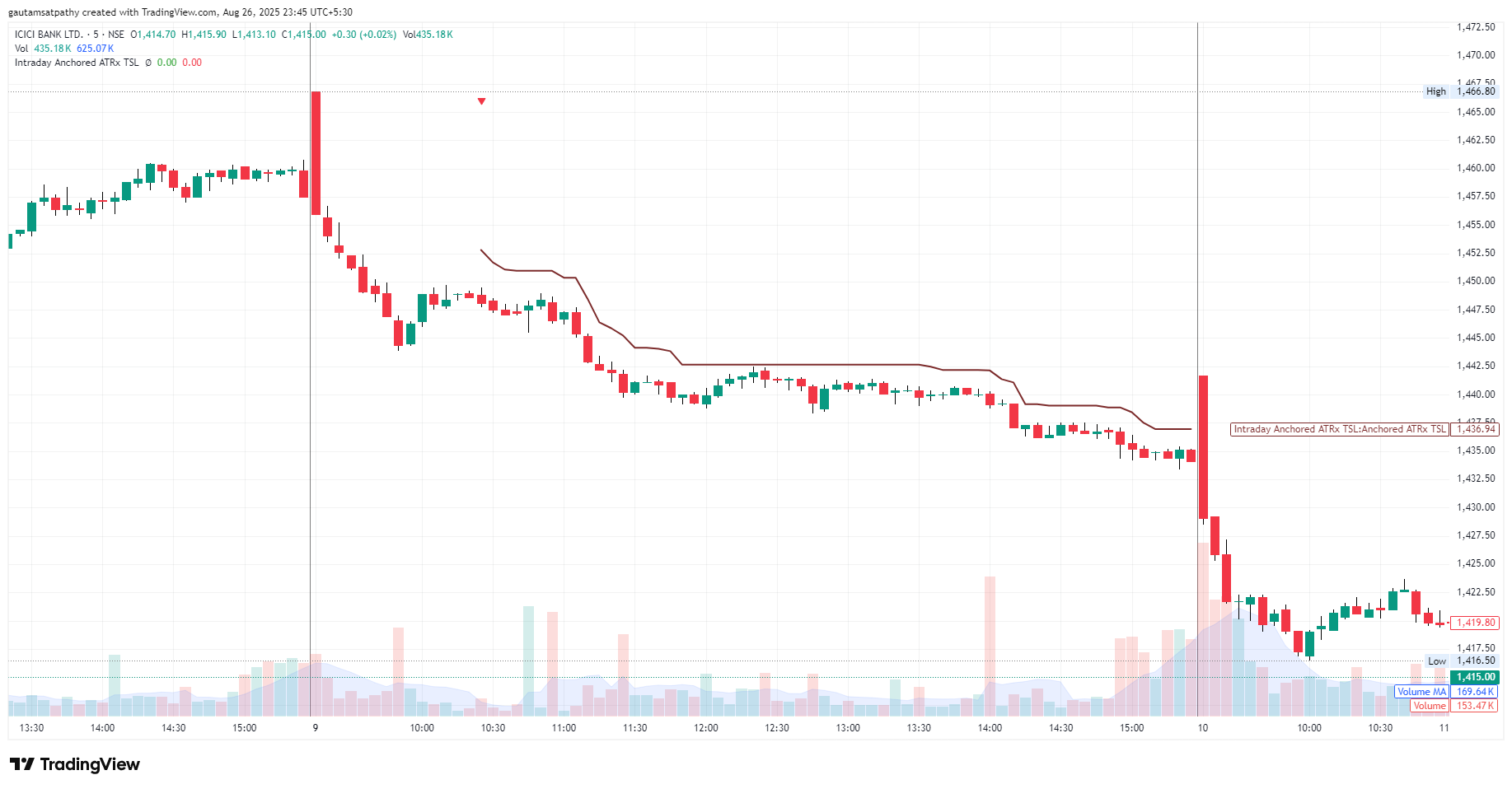
The 5 Minute chart of ICICI Bank shown here uses the Intraday ATR TSL Indicator in SHORT mode, using a 14 period ATR, an ATR multiple of 1.5 and a Bar Price of High. It also uses a "Look Back" of 1 (the default look back is 1). The look back allows us to use the price of a previous bar as the starting point. In this case, we use the High & ATR (14) of the previous bar (look back = 1) as our first indicator value. This is useful as we anchor the Indicator on our "Entry Bar" after a trade is triggered. This Entry Bar is still forming and is not a good startig point. The Trigger Bar's (previous bar) price is the best point to start our calculations.
As each subsequent bar is formed, it's High and ATR (14) are used to compute the new value (High + 1.5 * ATR). If the new value is higher than the previous value, the indicator will discard the new value and use the previous value - flattening out. You can see this behaviour in the ICICI Bank Chart above towards the middle of the day when the price reverses, forming 5 bullish bars which falls just short of our TSL.
The example above shows how the indicator allowed us to ride the entire trend all the way to the end of trading.
Lets look at another example, a LONG trade this time.
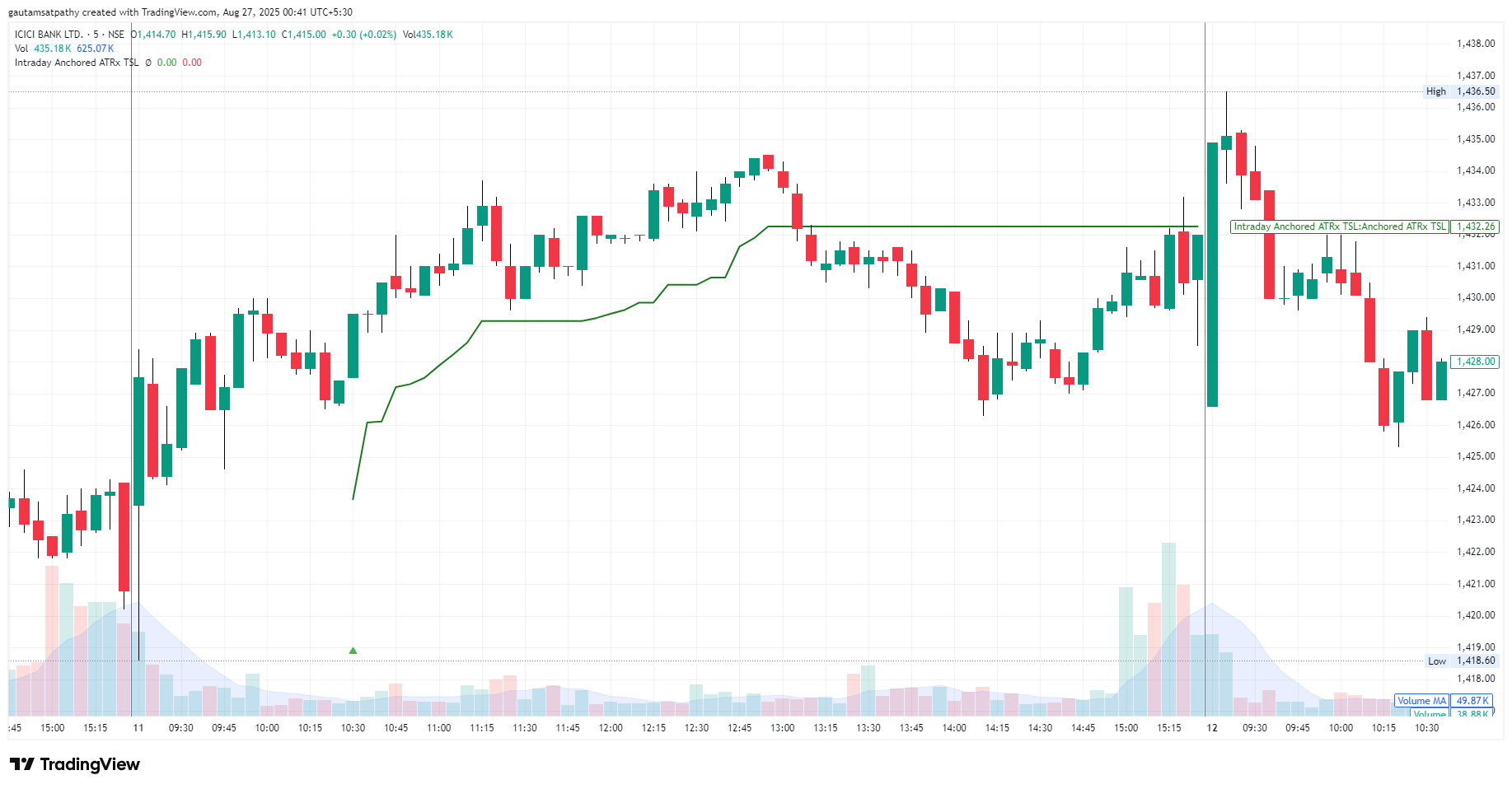
The first thing we notice is that the initial stop loss is larger! And the indicator maintains a greater distance from the price action than in our previous example.
That, my friend, is the magic of using Volatility to guide our steps!
Note that the candles on this day are larger and the price movement is more erratic. As a result the ATR value increases and the indicator happily obliges, keeping us in the trade till the trend changes in the afternoon and we are able to easily exit when price closes below the indicator on the 3rd bearish bar from the high of the day, locking in a very tidy profit without breaking a sweat all day.
Just looking at this day's price action gives me the shakes. But thanks to this neat little indicator I could happily stay in the trade as it unfolded.
Charanna Vyapari
The Intraday ATR TSL Indicator is available in Charanna Vyapari and can be used in Strategies as an exit mechanism. The Vyapari Trade Engine will automatically identify the presence of the indicator in the configured Exit Strategy and set the Anchor Bar to the Entry Bar when a trade is triggered, with a look back of 1, which would in effect pick up the price & ATR from the bar that triggered the trade. Subsequently, Vyapari's Trade Engine will keep scanning the Exit Strategy at each Bar (or Tick if you use that), and exit the trade at the open of the bar after the bar where the exit is triggered (Bar based exit).
Note that Vyapari can scan any number of instruments simultaneously and autonomically. Once started, the Trade Engine needs no manual intervention. In this example, an Entry was Triggered with an Extreme Bullish Reversal strategy and the Intraday ATR TSL Indicator based Exit allowed us to exit at a very nice profit.
(See details of how this works in the Vyapari Documentation)
Bonus: TradingView PineScript
The ZIP file below contains "IAA_ATR_TSL.pine". The code is subject to the terms of the Mozilla Public License 2.0 at https://mozilla.org/MPL/2.0/
Feel free to use it in your own trading. Would appreciate a shoutout on social media if you do use it.